
How to convert SVG to JPG
Published:
To turn an SVG into a JPG, the vector drawing has to be rendered into pixels at the size you need, with transparent areas filled with a background color. You can do it in your browser in a few clicks by choosing a scale or width and a background color.
Step by step
- 1Open “SVG to JPG” and add one or more SVG files.
- 2Choose the size: a scale from 1× to 4× or a width in pixels.
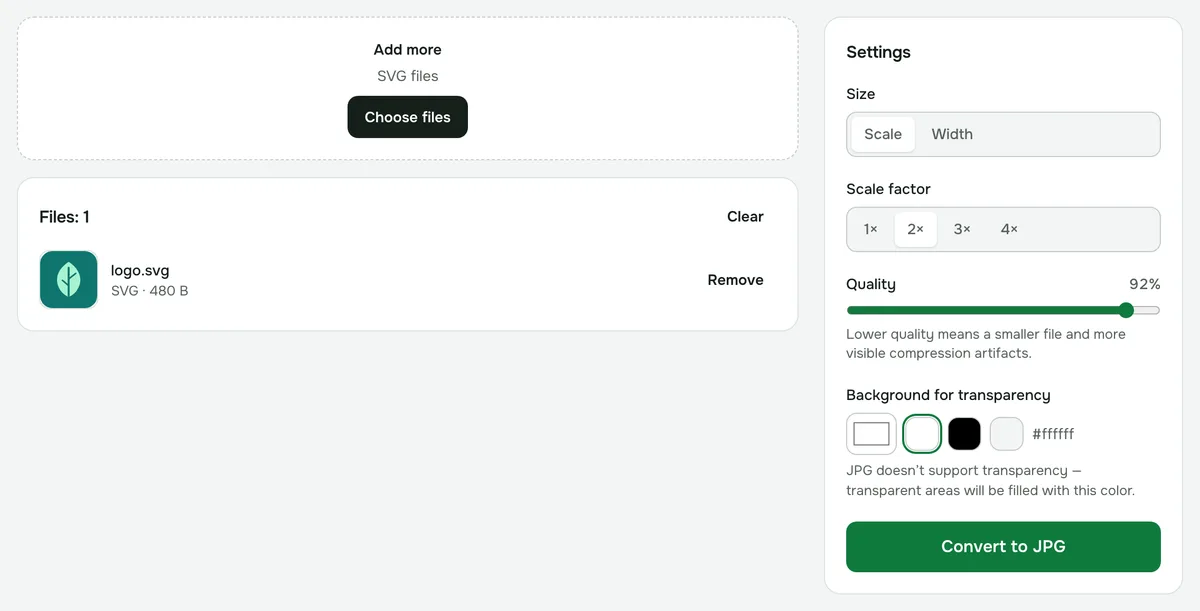
- 3Pick a background color for transparent areas and, if needed, adjust the quality.
- 4Click “Convert” and download the JPG — several files can be downloaded as one ZIP.
How SVG differs from JPG
SVG is a vector format: instead of pixels, it stores a description of lines and shapes, so the drawing stays sharp at any zoom level. It’s great for logos and icons, but many websites, messaging apps and document editors don’t accept SVG.
JPG is a raster image made of a fixed number of pixels. It opens anywhere, but loses sharpness when enlarged, so it’s worth picking the right size from the start.
Which size to choose
- “Scale” multiplies the SVG’s own size: 1× keeps the size set in the file, 2× (the default) doubles it, and so on up to 4×.
- “Width” sets an exact size in pixels, up to 16384 px. The height follows the drawing’s proportions.
- The vector drawing is rendered directly at the size you choose, so a large JPG comes out sharp, not stretched.
- If the result is too large for your device, you’ll see a message — lower the scale.
What happens to a transparent background
JPG can’t store transparency, so transparent areas are filled with the color from “Background for transparency” — white by default. You can pick black, light gray or any other color. If you need transparency, use “SVG to PNG”.
The default quality is 92%. Lower quality means a smaller file and more visible compression artifacts, especially on thin lines and text.
Limitations
- Embedded scripts don’t run, and external images and fonts aren’t loaded.
- Non-standard fonts are replaced with system fonts, so text may look different.
- Animation isn’t kept: the JPG shows the first frame.
Privacy
The conversion runs in your browser, and your files are never uploaded to a server.
SVG to JPG
Turn vector graphics into a JPG of any size with the background color you choose.
Open “SVG → JPG”