
How to reduce PDF file size
Published:
A PDF is almost always heavy because of the images inside: photos, scans, high-resolution logos. Text weighs very little. So compressing a PDF means scaling embedded images down to a sensible resolution. For scans, it means rebuilding the pages as compact JPEGs.
Step by step
- 1Open “Compress PDF” and add your document.
- 2Choose a mode: “Keep text” for regular documents or “Scanned document” for scans and photos of pages.
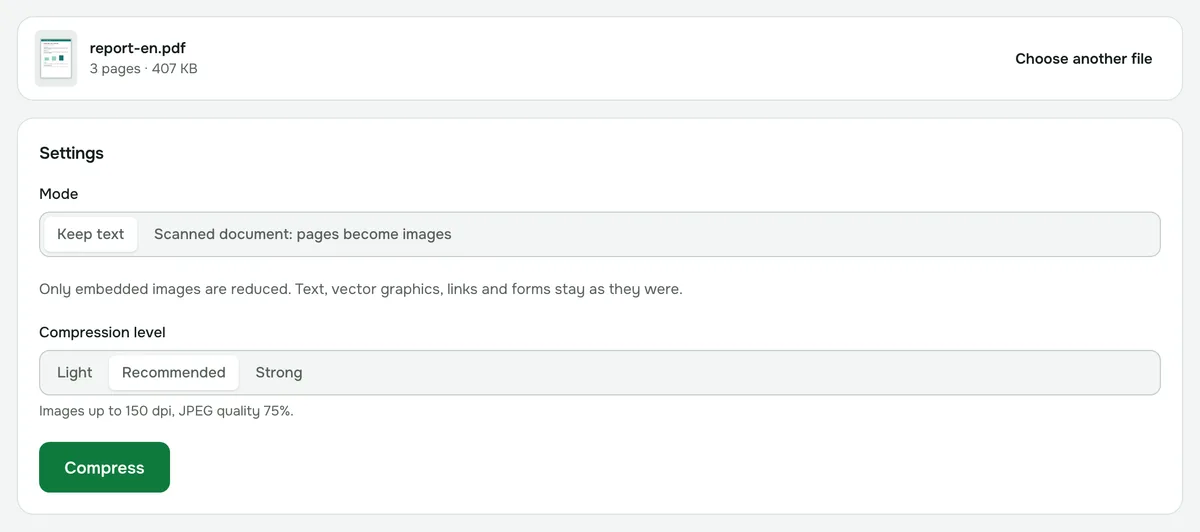
- 3In “Keep text”, pick a compression level — “Recommended” works in most cases. For scans, set the resolution.
- 4Click “Compress”, compare the size before and after, and download the file.
Which mode to choose
“Keep text” reduces only the embedded images. Text, vector graphics, links, forms and bookmarks stay as they were, so you can still select and search the text. Use it for contracts, slide decks and reports with photos.
“Scanned document” turns every page into an image and compresses it. This gives the smallest file, but text is no longer selectable, and links and forms are lost. It suits scans and photos of documents, where the text was already a picture.
What resolution you need
- 100–150 dpi is enough for reading on screen and sending by email.
- 200 dpi is better if the document will be printed.
- For text scans, turn on “Black and white” — the file gets even smaller.
Compressing a PDF for email and upload portals
Many email services cap attachments at around 20–25 MB, and job sites, school portals and online forms often allow much less. Check the limit first, then compress until the file fits.
If “Recommended” isn’t enough, try “Strong”. For a scan, lower the resolution or switch on “Black and white”.
If the file doesn’t get smaller
A document with almost no images is usually compact already — there’s nothing to compress. In that case we tell you so and offer the original file unchanged.
If it’s a scan, try the “Scanned document” mode — it compresses harder. If that doesn’t help either, lower the resolution or quality.
Is it safe to compress documents online?
In Folmixo, compression runs right in your browser. The document is never uploaded to a server, so it’s fine for an ID, a contract or a medical record. You can check this in the Network tab of your browser’s developer tools — no request carries the file.
Compress PDF
Shrinks a PDF by recompressing its embedded images — text, links and forms are kept. Scans get a stronger mode.
Open “Compress PDF”