
How to reduce a photo to 100–200 KB
Published:
Websites and application forms often cap photo size — say, no more than 200 KB. A phone photo weighs several megabytes, so it has to be compressed. That means lowering the quality and, if that’s not enough, the dimensions in pixels.
Step by step
- 1Open “Compress image to KB” and add your photo.
- 2Enter the target size in the “Max size, KB” field.
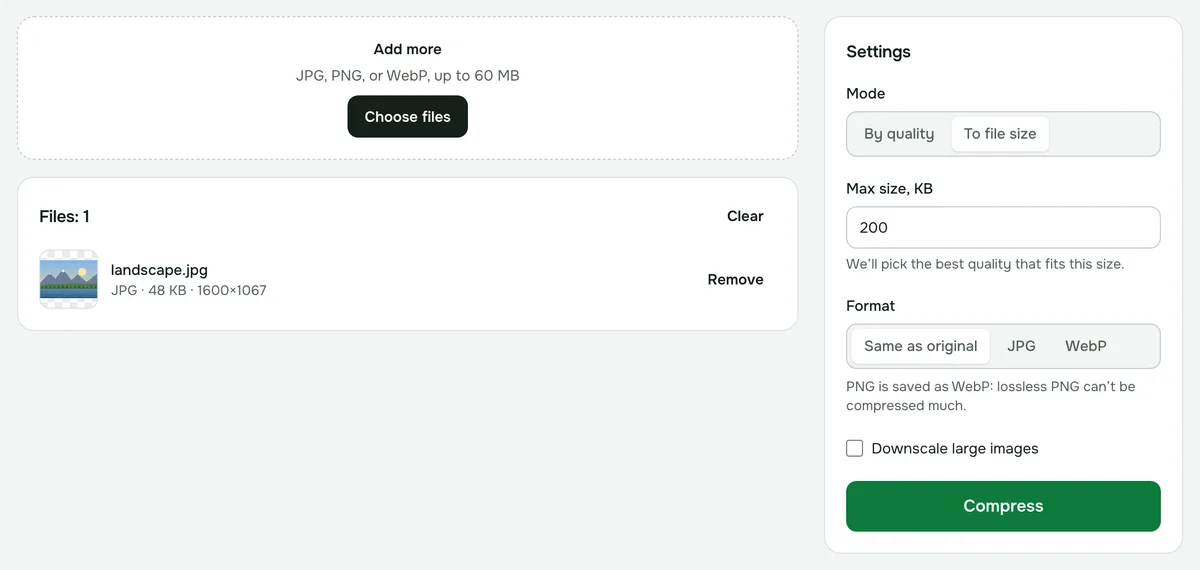
- 3Click “Compress” — the quality is picked automatically — and download the result.
If the photo won’t shrink to the target size
That means even the lowest quality is above the limit — the tool shows what it got. Turn on “Downscale large images” and set the long side, for example 1600 px. The file size drops several times, and that size is plenty for screens and forms.
What format the result will be
JPG and WebP keep their format. PNG is saved as WebP by default, because it can’t be compressed much without loss. If the site accepts only JPG, pick JPG yourself.
How many pixels you need
- For forms and profile pictures, 800–1200 px on the long side is usually enough.
- Photos for printing need larger dimensions — don’t shrink them too much.
Privacy
Compression runs in your browser — your photo is never uploaded anywhere.
Compress image to KB
Enter a size — say 100, 200 or 500 KB — and we’ll pick the best quality that fits. Handy for application forms and uploads with a size limit.
Open “Compress to KB”