
How to create a QR code for free
Published:
To create a QR code, choose what it should hold — a link, a Wi‑Fi network, a contact, an email or a phone number — fill in the fields and download the image as PNG or SVG. The code is free, has no watermark and never expires.
Step by step
- 1Open “QR code generator” and choose a type: “Link or text”, “Wi‑Fi”, “Contact”, “Email” or “Phone”.
- 2Fill in the fields — the code appears right away under “Your code” and updates as you type.
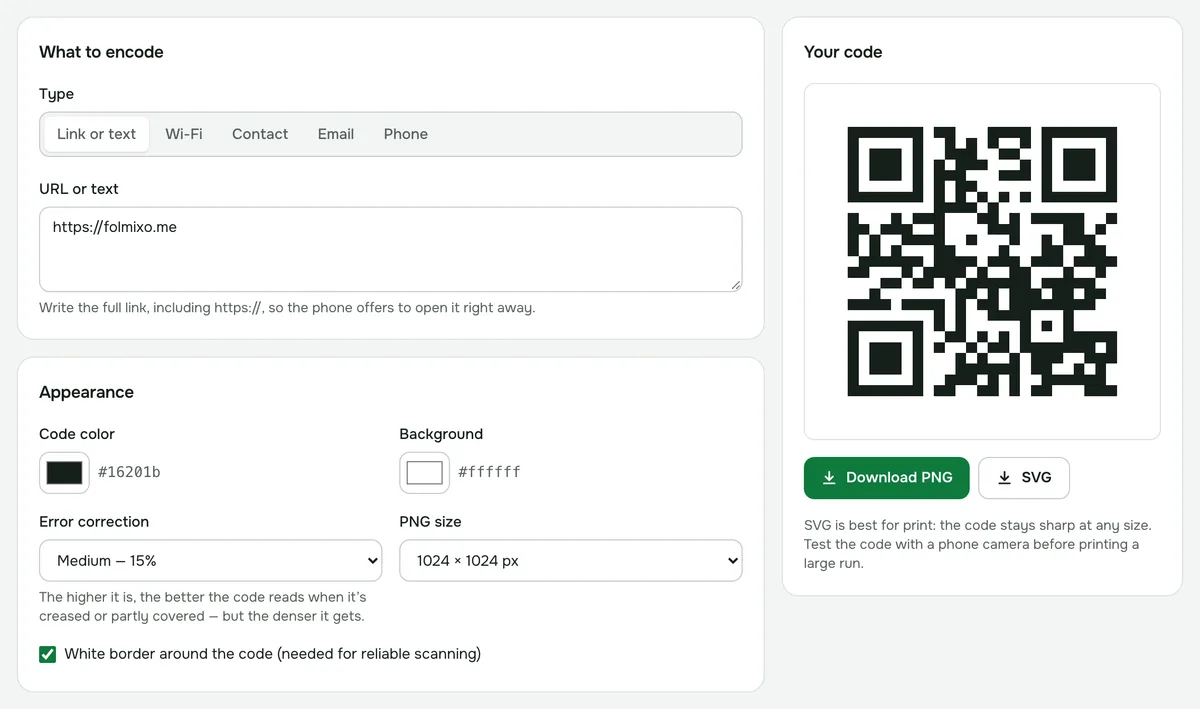
- 3If you like, change the code and background colors, the error correction level and the PNG size.
- 4Download a PNG or SVG and test the code with your phone’s camera.
QR code for Wi‑Fi
Choose “Wi‑Fi”, enter the network name and password, and set “Security” to WPA / WPA2 / WPA3 (what most home routers use), WEP or “No password”. If the network doesn’t show up in the list of available networks, check “Hidden network”.
Guests just point their phone camera at the code and the phone offers to connect — no typing in the password.
What else you can encode
- A link or any text. Write the full link, including https://, so the phone offers to open it right away.
- A contact: name, phone, email, company and website. After scanning, the phone offers to save the contact.
- An email: address, subject and message — the mail app opens with the message ready to send.
- A phone number: when scanned, the phone offers to call it.
One code holds about 2,900 bytes — roughly 2,900 Latin characters. The more data, the denser the code.
PNG or SVG?
PNG works for websites, presentations and messaging apps, in sizes from 256 × 256 to 2048 × 2048 pixels. SVG is a vector format, so the code stays sharp at any size — the better choice for flyers, business cards and signs.
How to make sure the code scans
- Use a dark code on a light background. Not every camera reads a light code on a dark background, and the generator warns you if the colors are too similar.
- Keep the white border around the code — it’s needed for reliable scanning.
- If the code will be on crumpled packaging or might be partly covered, raise the “Error correction” level. The code gets denser but still reads when damaged.
- Test the code with a phone camera before printing a large run.
Expiry and privacy
The code never expires and doesn’t redirect through our site: the link itself is stored in it, so it works as long as your link does. The code is generated in your browser — links, Wi‑Fi passwords and contacts aren’t sent anywhere.
QR code generator
A link, text, Wi‑Fi, contact or phone number as a QR code for print or screen. PNG and SVG.
Open “QR code”