
How to view and remove PDF metadata
Published:
Every PDF stores metadata in its properties: title, author, subject, keywords, the app it was made in, and creation and modification dates. You can view it, edit it or remove it entirely. The page content stays unchanged.
Step by step
- 1Open “PDF metadata” and add your document — its properties appear right away.
- 2Edit the fields you need or tick “Remove all metadata”.
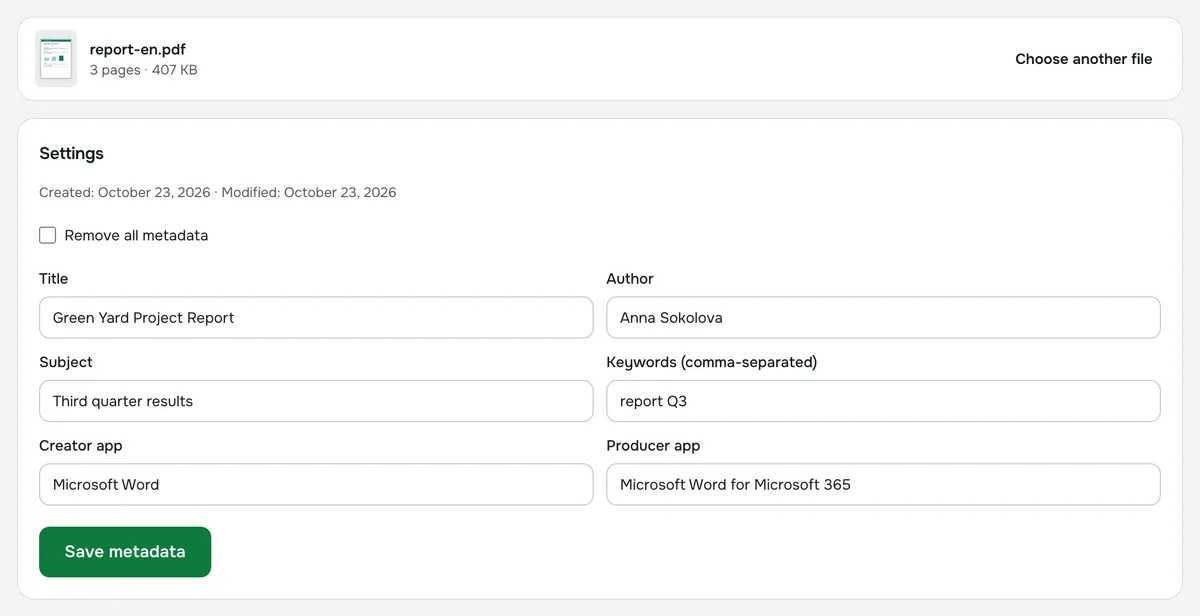
- 3Save the document.
Why remove metadata
Properties often keep the author’s name, the company name and the app used to make the document. If the file goes outside — to a client, a bid or a public website — it’s better to strip them.
What you can change
- Title and subject.
- Author and keywords.
- Creator app and producer app.
Creation and modification dates are shown so you can see what the document stores. When you edit the fields, the modification date is set to now.
Is XMP metadata removed too?
Yes. The XMP block is removed along with the document properties — otherwise apps could keep showing the old values.
What about photos?
Photos have metadata too — EXIF with the camera model, the date and sometimes the location. Use the separate “Remove metadata” tool for those.
PDF metadata
View, edit or remove the author, title, creator app and dates of a document.
Open “PDF metadata”