
How to combine photos into one PDF
Published:
To send several photos of documents as one file, combine them into a PDF. Each photo becomes a separate page, in the order you choose. You get one tidy document instead of a pile of images.
Step by step
- 1Open “JPG to PDF” and add your photos.
- 2Put them in the right order with the buttons or by dragging.
- 3Choose the page size, orientation and margins.
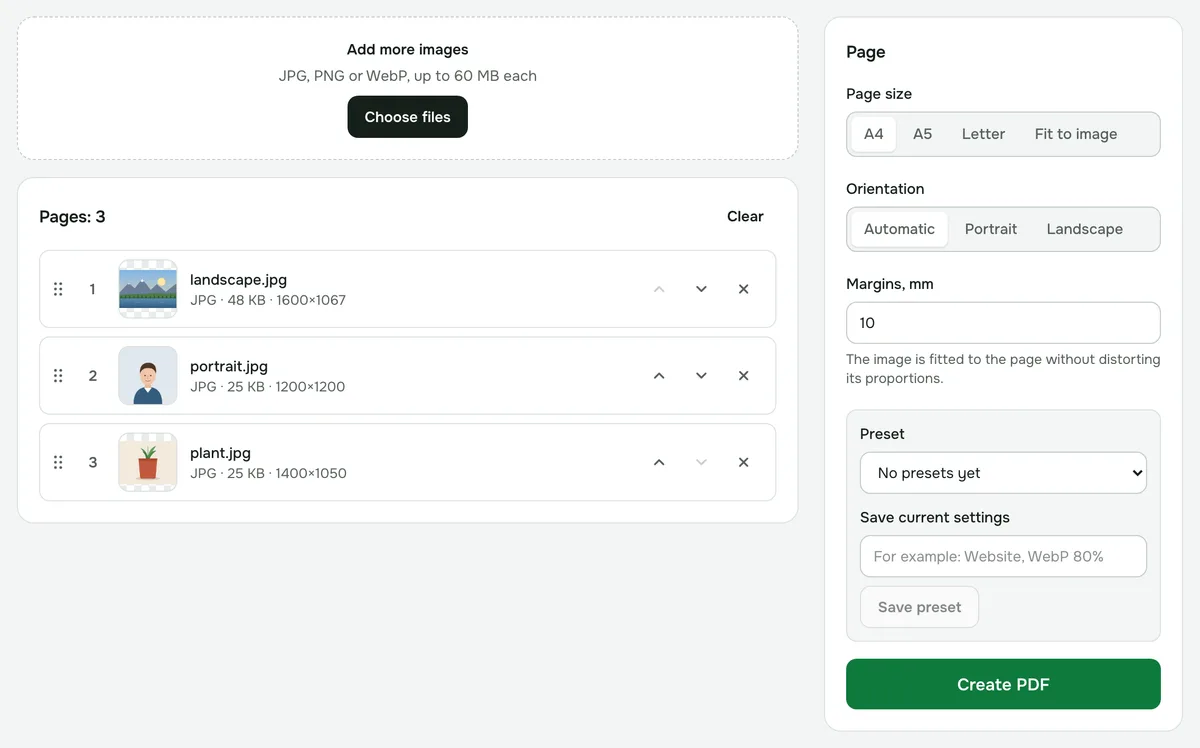
- 4Click “Create PDF” and download the document.
Which page size to choose
- A4 or Letter — for printing and official documents. The photo is fitted to the page without distorting its proportions.
- “Fit to image” — each page is exactly the size of the photo, with no margins. Handy for viewing on screen.
iPhone photos in HEIC format
Convert HEIC photos to JPG first with the “HEIC to JPG” tool — it also runs on your device. PNG and WebP can be added right away.
If the file turns out large
Phone photos weigh several megabytes each, so the PDF gets big. Shrink the finished document with “Compress PDF”, or reduce the photos beforehand.
Is it safe?
Your photos aren’t uploaded to a server: the PDF is built right in your browser.
JPG to PDF
Combine one or more JPG images into a PDF. Choose the order, page size, orientation and margins.
Open “JPG → PDF”