
How to make a favicon for a website
Published:
A favicon is made from a single square image or SVG, which is turned into favicon.ico and properly sized icons for iPhone and Android. Then you put the files in your site’s root folder and paste the ready-made code into the <head>.
Step by step
- 1Open “Favicon generator” and add an image — PNG, JPG, WebP or SVG.
- 2If the image isn’t square, choose “Fit” or “Crop to center”.
- 3If needed, pick a background color for the iPhone icon.
- 4Click “Create favicon” and download the archive.
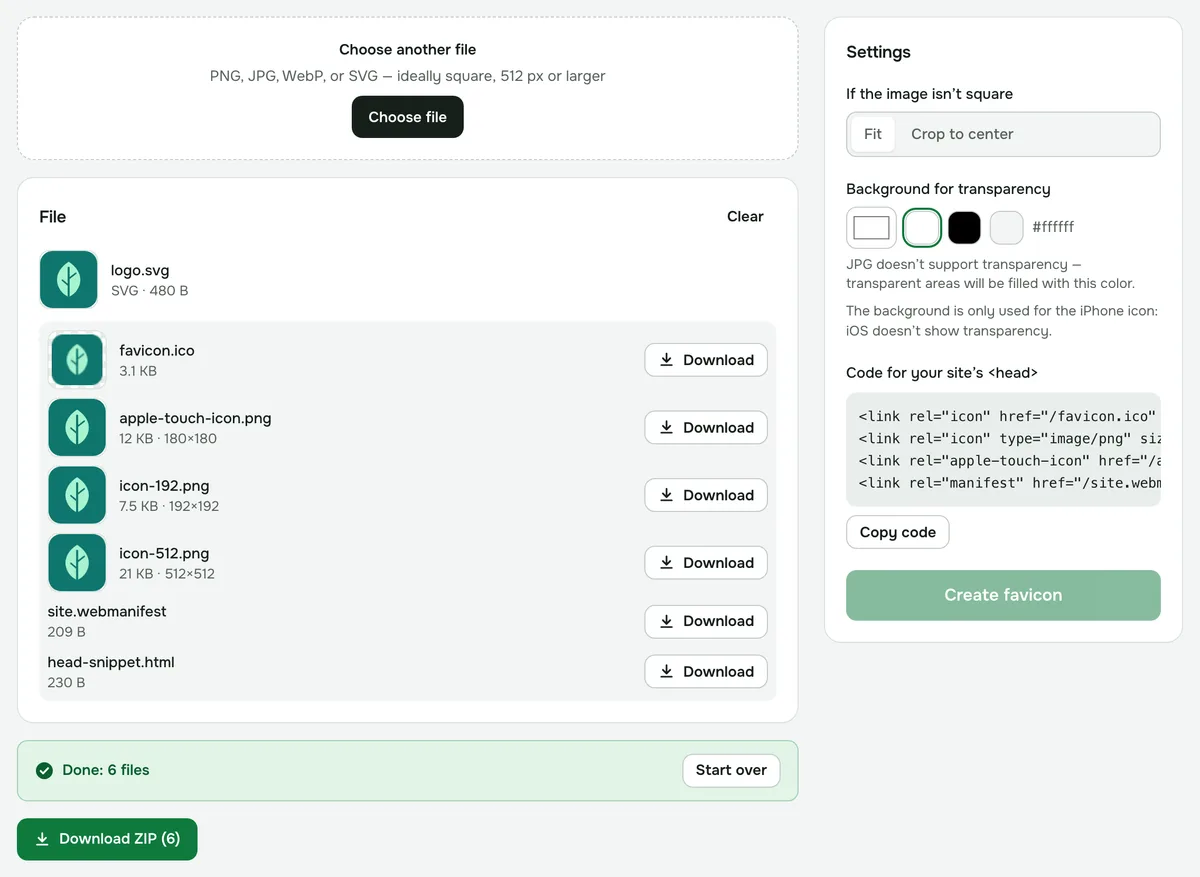
- 5Put the files in your site’s root folder and paste the code into the <head> of your pages.
Which image works best
A square image of 512 px or more, or an SVG, works best. In a browser tab the favicon is shown at 16 px, so fine details and text disappear: go for a simple mark, a letter or a simplified logo.
If the image isn’t square, “Fit” centers it with transparent padding, while “Crop to center” trims the edges.
What’s in the archive
- favicon.ico — the browser tab icon, containing 16, 32 and 48 px sizes.
- apple-touch-icon.png (180 px) — the icon for iPhone and iPad. iOS doesn’t show transparency, so transparent areas are filled with the background color you chose.
- icon-192.png and icon-512.png — icons for Android.
- site.webmanifest — the file that lists the Android icons.
- head-snippet.html — the ready-made code to link everything.
How to add the favicon to your site
Unzip the archive into your site’s root folder — where the home page lives — so the file opens at an address like example.com/favicon.ico. Then paste the code from head-snippet.html into the <head> of every page. You can also copy the same code right on the tool page with “Copy code”.
Browsers cache favicons for a long time. If you still see the old icon after replacing it, reload the page bypassing the cache or open the site in a private window.
Is it safe?
The image is processed in your browser and isn’t uploaded to a server, so your logo stays private until the site goes live.
Favicon generator
One image in — favicon.ico plus iPhone and Android icons out, in a single archive.
Open “Favicon”