
How to open iPhone HEIC photos on a computer
Published:
HEIC is the format iPhones use for photos by default. It’s more compact than JPG, but Windows, many websites and apps can’t open it. The simplest fix is to convert these photos to JPG, which works on any device.
Step by step
- 1Open “HEIC to JPG” and add your HEIC or HEIF photos.
- 2Adjust the quality and size if needed.
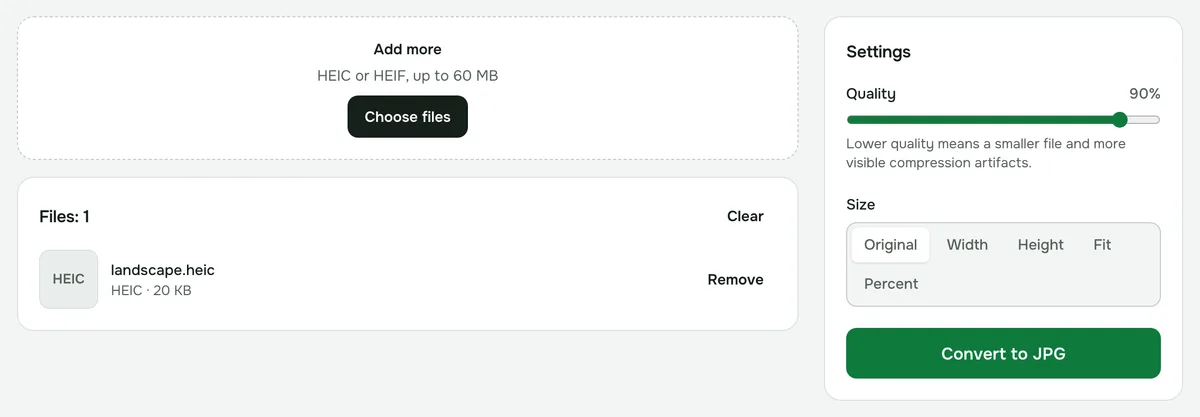
- 3Click “Convert” and download the result — several photos download as a ZIP.
Will the quality suffer?
JPG is lossy, but at the default 90% quality the difference is usually invisible. If you need no loss at all, use “HEIC to PNG”.
How to make your iPhone shoot in JPG
On your iPhone, go to Settings → Camera → Formats and choose “Most Compatible”. New photos will be saved as JPG; ones you’ve already taken still need converting.
What about location data?
EXIF metadata, including location, isn’t copied to the JPG. So you can share the photo without revealing where it was taken.
Privacy
Conversion runs in your browser; your photos are never uploaded to a server.
HEIC to JPG
Turn iPhone photos into regular JPG that opens everywhere. Orientation and size are kept.
Open “HEIC → JPG”